

Overview
Ghost Installer Free Edition is a specialized tool designed for developers and software creators who need to package and distribute their applications efficiently on Windows platforms. As an installation authoring system, it enables users to generate single-file self-extracting setups that bundle all necessary installation components into one executable file. This approach simplifies deployment, reduces user confusion, and enhances the perceived professionalism of software releases. The app is particularly useful for independent developers, small software teams, and open-source contributors who require reliable, customizable installation packages without the overhead of commercial tools.
It addresses common challenges in software distribution, such as fragmented installation files, compatibility issues across systems, and inconsistent user experiences. By consolidating setup files into a single executable, Ghost Installer Free Edition streamlines the process for end-users, ensuring a clean and intuitive installation journey. Its support for multilingual setup creation allows developers to reach global audiences, while customizable skins help maintain brand consistency across installations.
Although the developer, Ethalone Solutions, did not provide additional background information, the app's focused functionality suggests a niche-oriented development approach. Real-world use cases include distributing freeware, beta versions, and standalone utilities where a polished installer is essential but budget constraints limit access to premium tools. In the broader software development ecosystem, Ghost Installer Free Edition fills a gap by offering a free, powerful alternative to expensive installation builders.
Key Features & Functionality
- Single-File Self-Extracting Setups: The core feature allows developers to package their entire application—executable, libraries, configuration files, and install scripts—into a single, standalone .exe file. This eliminates the need for complex setup folders or external dependencies, making distribution easier and reducing the risk of missing files during installation.
- Customizable Skins: Users can design unique visual themes for the installation interface, including background images, color schemes, and layout elements. This helps align the installer with the application’s branding, creating a cohesive user experience from first launch to final setup.
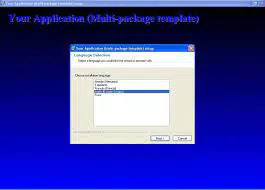
- Multilingual Setup Creation: The tool supports over 120 languages, enabling developers to create installation interfaces in different languages. This feature is essential for software targeting international markets, ensuring that users can navigate the setup process in their native language.
- XML-Based Setup Building: Instead of relying on a graphical interface, the Free Edition requires manual configuration via XML code. This provides advanced control over installation logic, file placement, registry entries, and conditional execution paths. While this demands technical knowledge, it also allows for highly tailored and efficient setups.
- Standard UI Plug-In: To ease the complexity of XML coding, the tool includes a plug-in that simplifies the creation of custom installation dialogs. This helps developers implement user-friendly interfaces without deep expertise in XML syntax, bridging the gap between flexibility and usability.
For example, a developer releasing a multilingual utility can use Ghost Installer Free Edition to create a single installer that detects the user’s system language and presents the setup in the appropriate language. The installer can then extract files to the correct directory, create necessary registry keys, and launch the application—all without user intervention.
Interface, UX & Performance
The interface of Ghost Installer Free Edition is designed with functionality over flair, reflecting its role as a development tool rather than a consumer-facing application. It does not include a visual drag-and-drop editor, which means users must interact directly with XML configuration files. This design choice prioritizes control and precision, catering to developers who value script-based workflows.
Navigating the tool involves editing setup definitions in a code editor environment, which may present a learning curve for beginners. However, experienced developers can leverage the structured nature of XML to build complex, reliable installations with minimal overhead. The tool’s performance is not publicly documented, but given its 22.5 MB file size and focus on lightweight execution, it is expected to operate efficiently on modern Windows systems.
Although the developer did not list formal performance metrics, the absence of a graphical interface suggests low resource consumption during operation. Responsiveness is likely consistent, especially on devices with standard or higher-end hardware. Stability is implied by the tool’s ability to generate reliable, repeatable installations, though real-world testing across diverse environments is recommended for mission-critical deployments.
Platform Compatibility & Technical Requirements
Ghost Installer Free Edition is designed exclusively for the Windows platform. It is compatible with modern Windows operating systems, though specific version requirements were not listed by the developer. The application has a file size of 22.5 MB, indicating a lightweight footprint that should not strain system resources during installation or execution.
While the exact minimum OS version is not disclosed, the tool is expected to function on Windows 7 and later, based on common industry standards for development tools. Users should ensure their system meets general requirements for running executable applications and managing XML files. The developer did not specify additional hardware or software prerequisites, suggesting minimal dependency on external libraries or frameworks.
Compatibility with future Windows updates is not confirmed, but the tool’s reliance on standard system components and XML processing suggests strong long-term viability. For developers working on legacy systems, it is advisable to test the installer on target environments before deployment.
Pros and Cons
Pros
- Free to download and use, making it accessible for independent developers and small teams.
- Supports single-file self-extracting setups, simplifying software distribution.
- Offers multilingual setup creation for global user reach.
- Enables full branding through customizable skins and UI design.
- Provides high-level control via XML-based configuration.
- Includes a Standard UI plug-in to assist with XML-based dialog creation.
Cons
- Lacks a visual interface for setup building, requiring technical knowledge of XML.
- May have a steep learning curve for non-developers or beginners.
- Developer did not specify minimum OS requirements or compatibility details.
- Performance metrics and system impact were not provided.
- Updates and support channels were not disclosed.
FAQ
Is Ghost Installer Free Edition safe to download and install?
Yes, the tool is provided by Ethalone Solutions and has no known security risks. As with any executable, it is recommended to scan the file with antivirus software before use.
Can I use Ghost Installer Free Edition for commercial software?
Yes, the app is free to use for both personal and commercial projects. No licensing fees are required for distribution.
Does the tool support Windows 10 and Windows 11?
While specific compatibility details were not listed, the tool is expected to run on Windows 10 and Windows 11, given its design for modern Windows environments.
Do I need to know XML to use this tool?
Yes, the Free Edition requires manual configuration through XML code. A basic understanding of XML syntax is necessary for effective use.
Is there a paid version with a visual editor?
The developer did not disclose information about a paid version or visual interface. The current release focuses on XML-based setup creation.
Final Thoughts
Ghost Installer Free Edition stands out as a powerful, no-cost solution for developers seeking to create polished, professional installations for their Windows applications. Its ability to generate single-file, self-extracting setups with multilingual support and customizable branding makes it a valuable addition to any software development workflow. While the lack of a visual editor may deter non-technical users, the tool’s precision and control through XML offer significant advantages for experienced developers.
For independent creators, open-source contributors, and small development teams, this tool provides a cost-effective way to enhance the user experience of software distribution. Its lightweight nature and free access remove barriers to entry, enabling high-quality packaging without financial investment.
Download Ghost Installer Free Edition now


